
A newer version of Simple Stats is currently available

Simple Stats is here!
This script allows you to analyze log files created by the JW FLV Player so they are easy to read.
OK so here is the deal. This script requires that you run the stats program by Will and then the Ruby Script to have a nice file generated for you. This software is issued without any warranties. Please do not use this script on any mission critical applications as it is still beta.
Planned Features
- IP filtering to allow a single IP viewing history
- PNG conversion of the SVG to allow more browsers to view the graph
- Filtering of bad log info made by invalid entries
- Dated log files
- Please leave a comment if you have a feature request
Getting Started
We will all ready assume that you are familiar with the JW FLV Player and the Callback function that is used to generate a log file of views. If not Click Here.
- Install Ruby If you all ready have Ruby installed you can skip this step (Mac OS X 10.2 and Higher have Ruby).
- Download Simple Stats V .01
- Unzip the file. You will have a folder with: SimpleStats.rb, xhtml.template, video_stats.php, and sub folder named SVG
- To run from your desktop you will need to download your log file into the folder you just created
On Windows
- Open your commands prompt and navigate to the folder you created
- Type in: ruby SimpleStats.rb video_stats.log >today.log
- By default the stats script creates a file called video_stats.log. If you change the file name you will need to modify the above command for it to work
- The above command will generate a file called today.log in the directory of the original log file for you. It will also create a stats.html file. If you have Safari Beta 3 or the latest version of Firefox it will be able to view the SVG graph file created. If not it will be blank and just show the log results.
On Mac OS X
- Open up terminal and navigate to the folder you created
- Type in: ./SimpleStats.rb video_stats.log >today.log
- The above command will generate a file called today.log in the directory of the original log file for you. It will also create a stats.html file. If you have Safari Beta 3 or the latest version of Firefox it will be able to view the SVG graph file created. If not it will be blank and just show the log results.
Programmers
- Daniel G. Taylor – Simple Stats Script
- Will – Statistics Log Script
Testers & Feedback
| Simple Stats Photo Gallery |
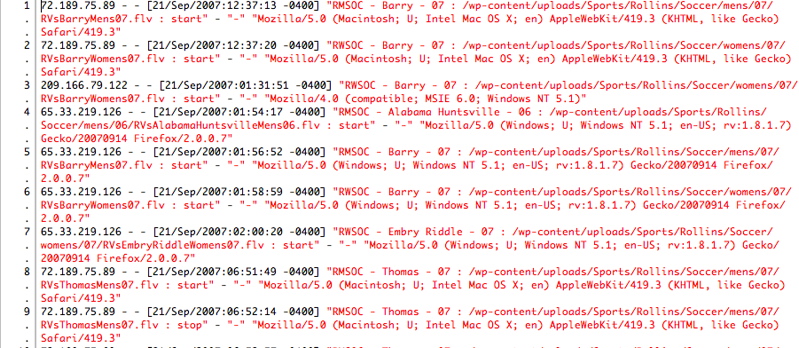
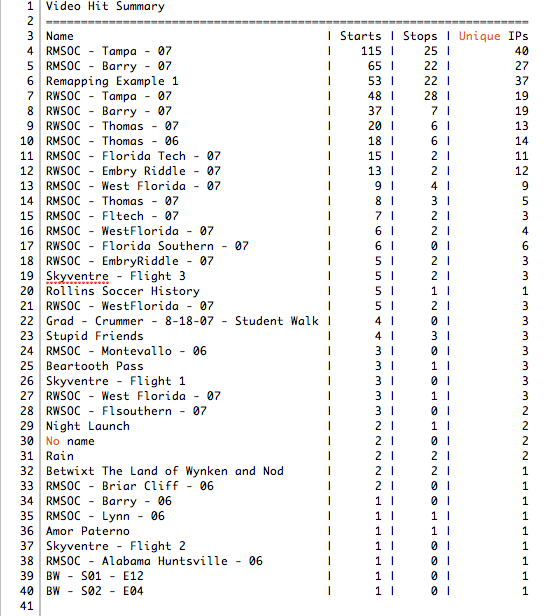

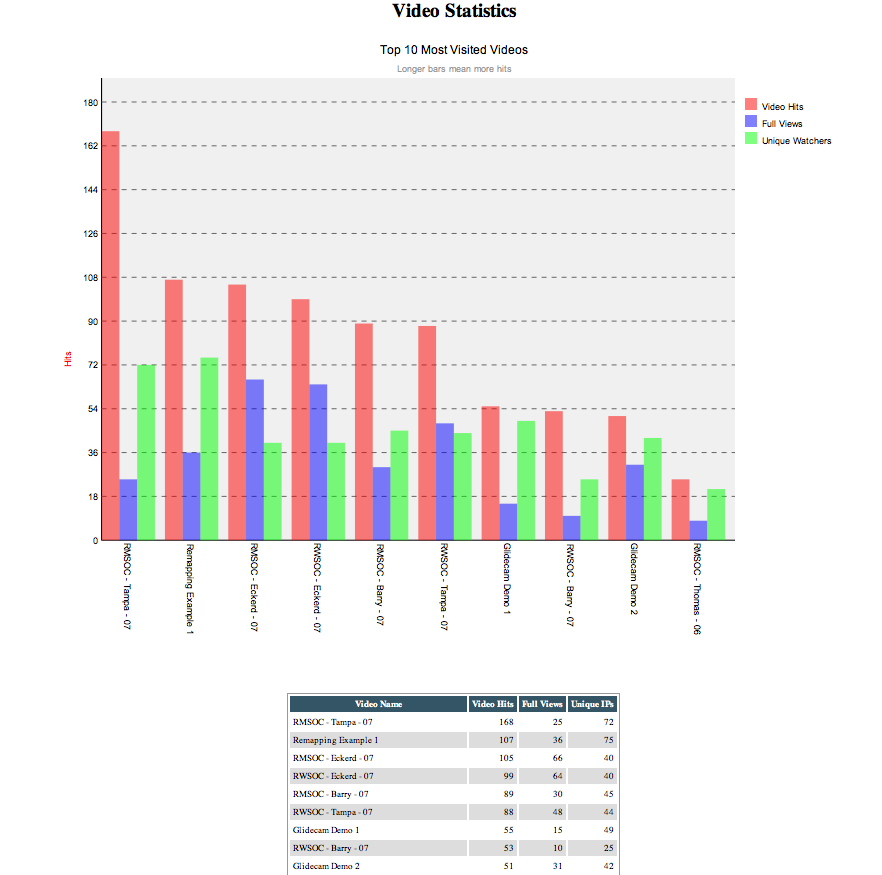
Currently there are no other languages but we welcome anyone who wants to help translate the information.
does anyone knows if there is any other information about this subject in other languages?
This is the solution:
http://blade.nagaokaut.ac.jp/cgi-bin/scat.rb/ruby/ruby-dev/32040
Please note this is editing the Ruby Install not the SimpleStats Script. If you update ruby after this fix you might need to re-apply it.
Please use caution editing your files. Edit at your own risk.
Basically you need to open the document.rb file, find the:
def write( output=$stdout, indent=-1, trans=false, ie_hack=false )etc.
and replace with:
 def write( output=$stdout, indent=-1, transitive=false,

ie_hack=false )

       if xml_decl.encoding != "UTF-8" && !output.kind_of?(Output)

         output = Output.new( output, xml_decl.encoding )

       end
Note that you need to delete the original def write( all the way to its end statement which is a few lines and replace with the new bit. After that it works fine for me. I was seeing same issue on friends computer but this solved it.
Hey guys,
I’ve been tyring to get your stats to work with my JW player and i have been able to generate the .log file properly, however, when i run the Ruby script, i get the following error:
c:/ruby/lib/ruby/1.8/rexml/document.rb:186:in `write’: undefined local variable
or method `transitive’ for … :REXML::Document (NameError)
from ./SVG/Graph/Graph.rb:211:in `burn’
from SimpleStats.rb:344:in `simple_summary_bar_chart’
from SimpleStats.rb:343:in `open’
from SimpleStats.rb:343:in `simple_summary_bar_chart’
from SimpleStats.rb:409
and the SVG file is created but at 0 bytes ..
it’s difficult to track all of the updates in the various threads on the JW forums, so i’d appreciate if you could contact me directly ..
are you still planning to update the script?
are you familiar with the error i’m getting? should i reinstall ruby?
I’m running windows XP 64 bit, by the way
many thanks
-jeremy